


Week ending 25 October 2026 · Development diary
The last diary introduced reusable templates. This week brought the next practical question: what happens when a record already contains useful information, but another template would suit it better? The work leading to QueVault 0.9.5 now gives that record a way to change shape without making you retype everything.
A preview before committing to a new layout
Single-record conversion suggests how existing fields could fit the destination template. You can adjust those mappings with drag-and-drop or source menus, inspect the preview, and undo the conversion before saving. Values that do not fit are retained in Additional Fields rather than quietly discarded.
That matters because a more useful template should not come at the cost of the information you have already entered. The deliberate review step is part of the design: suggested mappings are a starting point, and conversion currently handles one record at a time. It is not a bulk reorganisation tool.
Less friction around the information you need
There were smaller changes around that same principle of keeping control. Concealed sensitive values can now be copied without first revealing them. Recovery-code paste asks whether detected list numbering should be kept, giving you a choice when a provider’s copied list includes numbers alongside the codes.
A hidden sidebar now has a visible way back, and Mac device authentication no longer competes with automatic password-field focus. The email and web-link preference was also connected to the record links themselves: switching it off leaves the values visible and copyable, while preventing those fields from opening external destinations. Help now makes clear that saved addresses are not verified by QueVault, particularly when they arrive through imported records.
Showing the actual app
The template guide on the QueVault website now uses twelve real application screenshots with fictional example records. These replace the mock-ups and show the worked examples and Community workflow as they appeared in the development build. The updated guide is public, and the website’s holding page has been removed.
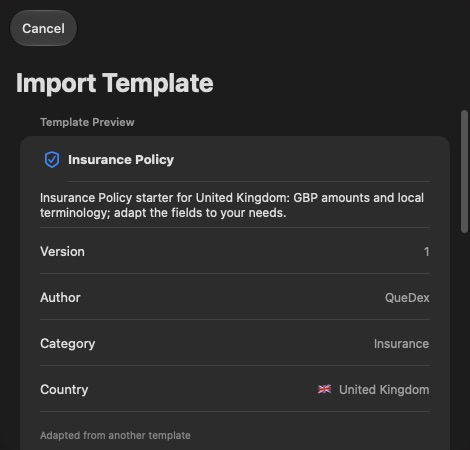
Read the illustrated Template Builder guide.
Help and onboarding received a matching review, including clearer online/offline explanations and onboarding pages that scroll in smaller windows. The website and app need to tell the same story, especially where a reusable template and a record containing personal information are different things.
What is ready, and what still needs checking
The 20 October development checkpoint is version 0.9.5, build 35. Mac and iOS builds and conversion/template checks were reported as passing at that checkpoint. That is development progress, not an App Store release announcement or a claim that every later working change has been validated.
Website support also needed attention this week. Turnstile verification was enabled for the support form, and submissions with missing or fake verification tokens were confirmed rejected. A successful human-verified submission still needs a manual check. It is a useful improvement to the support route, with a specific follow-up still outstanding.